Zealder Documentation
Text Editor User Guide

Interface
Text Editor provides a clean and simple user interface. If you are familiar with desktop word processors like Microsoft Word or OpenOffice.org Writer, you will quickly see that using an online text editor is just as easy and intuitive.
Interface Structure
The figure below shows main building blocks of Text Editor:
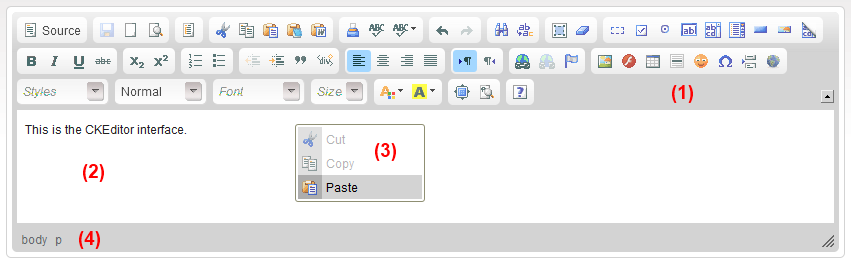
The editor consists of five main parts:
- Toolbar (1) - the section at the top of the editor containing grouped menu buttons that give you access to various functions of Text Editor.
- Editing Area (2) - the space below the toolbar where you type your text and add media.
- Context Menu (3) - a small pop-up menu with shortcuts to most common operations available for the object, visible after a right mouse button click or pressing the Application/Menu key on your keyboard.
- Elements Path (4) - the section at the bottom of the editor displaying information about the HTML elements of the document (advanced feature).
- Dialog Windows - small pop-up windows that appear when you use some of the editor's functions and are opened by clicking the toolbar buttons.
Resizing and Maximizing Text Editor
Text Editor is embedded in a web page, as one of its parts. If, however, you would like to resize its interface, you can easily do it by clicking and dragging the  resizing grip in the bottom right-hand corner of Text Editor interface.
To make writing more convenient, you can also maximize the Text Editor interface in the browser window. When you press the  toolbar button, the Text Editor interface will fill the browser window and stretch to its borders. If you want to return to the default view and minimize Text Editor, press the same button again.