Zealder Documentation
Text Editor User Guide

Font Name
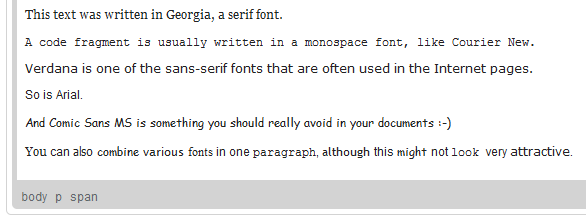
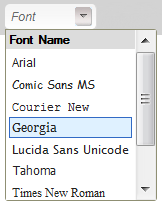
In Text Editor the Font is the typeface that will be applied to the document text. Fonts are pre-defined sets of characters with uniform styling collected under one name. The Text Editor default collection of fonts includes most popular serif fonts (Times New Roman, Georgia), sans-serif fonts (Arial, Verdana, Tahoma), and monospaced fonts (Courier New).
To change a font for a text fragment, open the Font menu by clicking the  button on the toolbar. The font drop-down list contains a number of typefaces that you can use. To make the choice easier, the font names are displayed in a font that they represent, giving you a preview of what the text will look like.
A font can be applied to the whole document, a paragraph, or a text fragment of arbitrary length - even a single letter. Do note, however, that for aesthetic and readability reasons it is recommended not to combine too many different fonts in one document.